Aseprite Dithering Brushes
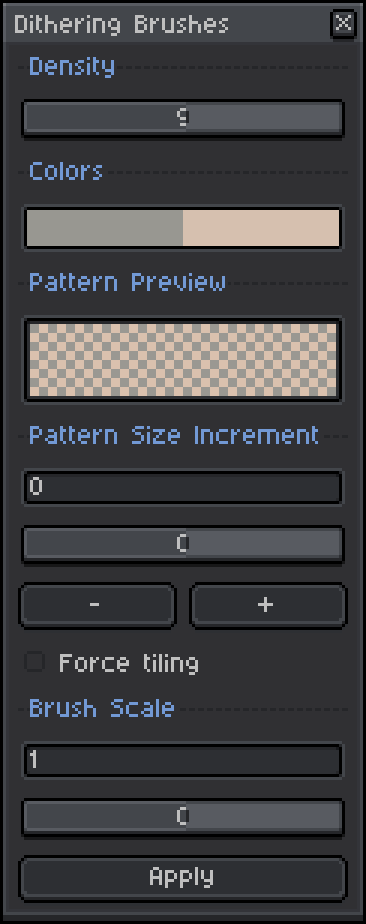
This is an extension for Aseprite that provides a dedicated tool window for dithering brushes. Density controls the balance between the foreground and background colors. A higher density means that more of the pattern will be occupied by the foreground color. The colors displayed are linked to the current foreground/background colors, and cannot be changed through the 'Dithering Brushes' menu directly. The pattern preview shows the pattern associated with the current density using the current foreground/background colors.The pattern size increment refers to the number of pixels by which the pattern should be expanded. Dithering patterns have a fixed minimum size of 4x4 pixels, so a pattern size increment of 2 will tile the 4x4 pattern into a 6x6 space. If force tiling is checked, increment values will be clamped to multiples of 4 to ensure that patterns tile perfectly. Patterns may not tile correctly for other increments. Negative values below -2 are not supported. For best results, use multiples of 4.The brush scale refers to a scale factor that is applied to the incremented pattern. For a brush scale of 2, the 6x6 pattern from before will be scaled into a 12x12 brush. Values less than or equal to zero are not supported. Version 2.0.0 The apply automatically option will automatically update the brush whenever any fields in the dithering brushes dialog are changed.Version 2.0.1 The pattern size increment can go below 0, as low as -2 to allow for smaller brush sizes. Only values of -1 and -2 are supported because smaller sizes make the pattern size 0. A value of -2 will give you a 2x2 brush, for example.
 xokem 1 games· 45 followers· 10 ratings· portfolio 50 View creator →
Ratings over time
Cumulative · 30dScreenshots
1 / 2