PSV Cleaner - PlayStation Vita Temporary Files Cleaner
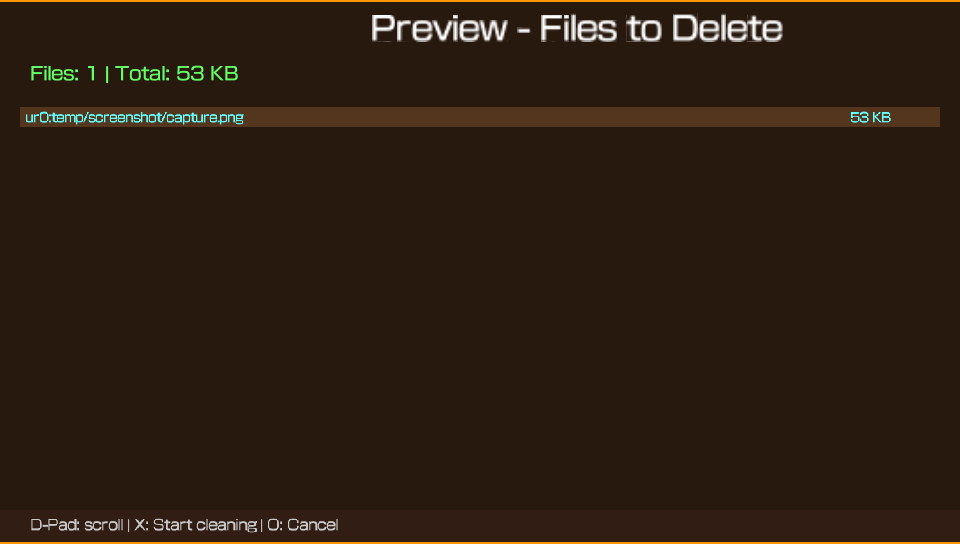
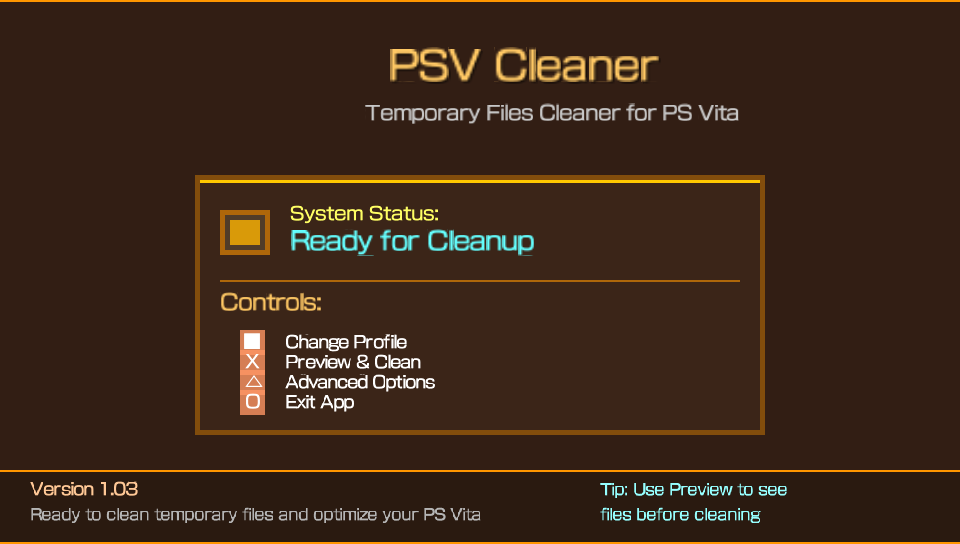
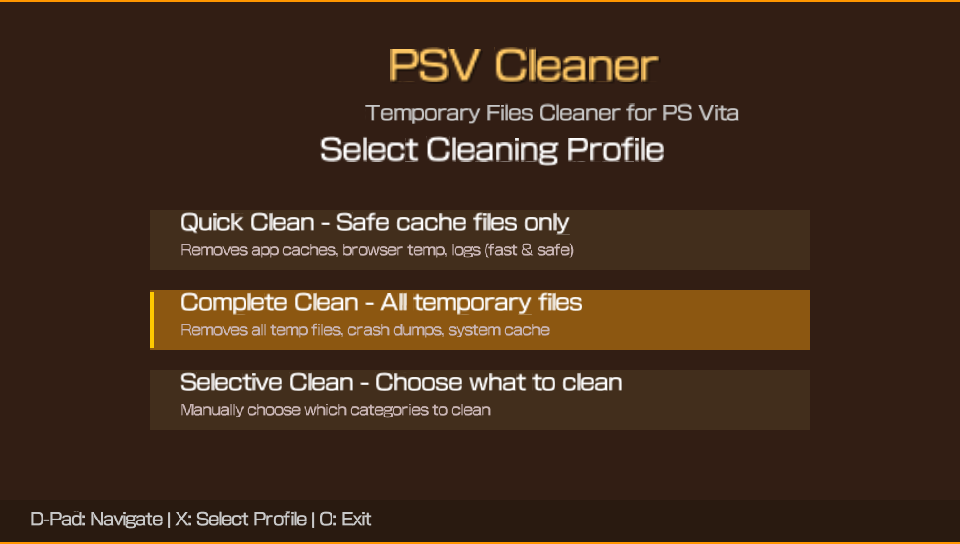
PSV Cleaner is a powerful and user-friendly temporary files cleaner designed specifically for the PlayStation Vita homebrew community. This tool helps you free up valuable storage space by safely removing temporary files, cache data, and system dumps that accumulate over time. Key Features Comprehensive Cleaning - Removes 45+ types of temporary files including system cache, homebrew logs, and application data Safe & Secure - Only deletes temporary files, never touches your games, saves, or important data Selective Cleaning - Choose what to clean with an intuitive options menu Real-time Statistics - See exactly how much space you can free before cleaning Modern Interface - Clean, professional UI with smooth animations GPU Optimized - Designed to prevent crashes and ensure stable performance What It Cleans System temporary files and cache VitaShell file manager cache and logs PKGi package installer temporary files RetroArch emulator cache and logs Crash dump files (psp2core, psp2dmp) Browser cache and temporary files Homebrew application logs and cache USB storage temporary files Download incomplete files System update temporary files Easy to Use Launch the application View how much space can be freed Press Triangle to open options menu Select what you want to clean Press X to start cleaning Watch the progress bar complete ️ Safety First ✅ 100% Safe - Only removes temporary files ✅ No data loss - Games and saves are never touched ✅ Automatic permissions - Handles locked files safely ✅ Crash protection - GPU-optimized to prevent system crashes Technical Details Platform: PlayStation Vita (all models) Requirements: Henkaku/Enso homebrew support Size: Small footprint, efficient memory usage Performance: 60 FPS, GPU-optimized rendering Compatibility: Works with VitaShell, PKGi, RetroArch, and more Perfect For Homebrew users who want to free up space RetroArch players with large cache files PKGi users with accumulated temporary files VitaShell users with file manager cache Anyone who wants a cleaner, faster PS Vita Benefits Free up storage space for more games and apps Improve system performance by removing clutter Organize your Vita with regular maintenance Prevent storage issues before they become problems Extend your Vita's life with proper maintenance Installation Download the VPK file Install using VitaShell or PKGi Launch from LiveArea Start cleaning immediately! Important Notes Backup important data before first use (though it's safe, it's always good practice) Works best with regular use to maintain optimal performance Compatible with all major PS Vita homebrew applications Community This tool is developed for the PlayStation Vita homebrew community and is completely free to use. No ads, no tracking, just a clean and efficient way to maintain your PS Vita.Download now and give your PlayStation Vita the cleaning it deserves! V 1.16 Version 1.16- Aug 14, 2026 FixedConsole freeze during cleaning: cleaning now runs on a background worker thread. The UI keeps rendering and reading input during Quick Clean, Complete Clean, Selective Clean and per-app cleaning — no more frozen screen.Emergency stop always responsive: the Circle button is polled every frame during cleaning, even on very large directories.Safer deletion: deleteRecursive no longer deletes files while iterating the same open directory handle (entries are collected first), which could stall sceIoDread on FAT/exFAT; added periodic yields.Non-blocking space refresh: the space calculation no longer blocks the main loop while waiting for the app rescan. V 1.15 Version 1.15- Aug 10, 2026 New look fix bug and more V 1.14 Version 1.14 - July 7, 2026 Crash Bug Fix (Cache Buffer Overflow) Add Precise & Responsive Progress Bar (UI Freeze Fix) Typo Fixes & Config Enforcement (ONEMenu & Helper Filter) .PKG File Cleaning support V 1.13 Fixed crashes when navigating cleaning profiles in the main menu. Improved UI alignment in Advanced Configuration to prevent selection bars from overlapping. Added dynamic color feedback for checkboxes (Active vs Inactive). Enhanced path validation to support multiple partitions (ux0:, ur0:, uma0:). Improved TitleID validation to prevent accidental deletion of installed app data. V 1.10 Version 1.10 - December 30, 2025 What's New Folders checked for each installed app:ux0:data/[TITLEID]/ - The app's main data folderux0:patch/[TITLEID]/ - The app's patches folderux0:addcont/[TITLEID]/ - The app's DLC/addons folderWhat is cleaned in each folder:Subfolders: cache/, temp/, tmp/, logs/, log/Temporary files in the root with extensions: .tmp, .temp, .log, .cache, .bak, .old, .swpFiles with names containing: "temp", "tmp", "cache", "log"Folders NOT touched (for security):ux0:user/00/savedata/[TITLEID]/ - Saved files (never touched)ux0:app/[TITLEID]/ - Files from the app itself (never touched)The feature now scans all three folders for each app installed, finding more temporary files and freeing up more space. Implemented feature: Selective cleaning for individual apps: Press SELECT in the main menu to open the app list.The list shows all installed apps with occupied space.Navigate with the D-Pad, clean with X, go back with O.How it works:Press SELECT in the main menu.A list of all installed apps is displayed.Each app displays its TITLE ID and the space occupied by temporary files.Navigate with the D-Pad ↑↓ to select an app.Press X to clean that app's temporary files.A confirmation message appears with freed space.The list updates automatically after cleaning. V 1.03 Added Cleaning Profiles System - Three intelligent cleaning modes Quick Profile - Only safe cache files (VitaShell, PKGi, RetroArch, Browser, etc.) Complete Profile - All temporary files and system cleanup (default mode) Selective Profile - User manually chooses which categories to clean Profile Selection Screen - Elegant initial screen at app startup Navigate profiles with D-Pad Up/Down Detailed descriptions for each profile mode One-time selection that configures the entire session Cleanup Counter System - Persistent statistics tracking Saves total number of cleaning sessions Displays "Cleanup #X" on completion screen Persistent storage in ux0:data/PSV_Cleaner/counter.txt Additional Cleaning Paths - Extended coverage ux0:download/ and ux0:downloads/ complete directory scanning Enhanced download temporary file detection Improved User Interface Centering - Professional text positioning All main titles perfectly centered on screen Consistent button alignment and spacing Improved visual hierarchy Profile-Based Menu Initialization - Dynamic menu configuration Menu options automatically set based on selected profile Quick mode: only cache categories enabled by default Complete mode: all cleaning options enabled Selective mode: nothing pre-selected for manual choice Navigation Experience - Enhanced user flow Square Button: Change cleaning profile anytime Seamless switching between profile modes Persistent profile memory during session Technical Added PROFILE_QUICK, PROFILE_COMPLETE, PROFILE_SELECTIVE enum system Dynamic menu initialization with profile parameter Persistent counter file management Enhanced download path coverage (now 95 cleaning paths total) Improved text positioning calculations for perfect centering V 1.02 Added File Preview System - View all files that will be deleted before cleaning with detailed list Scrollable file list supporting thousands of files Individual file sizes displayed Total files count and size summary Navigate with D-Pad Up/Down Confirm with X or cancel with O Enhanced File Detection - Added 40+ new cleaning paths VitaGrafix cache and logs reF00D cache NoNpDrm temporary files 0syscall6 cache TAI plugin system cache PSVshell logs and cache SaveManager logs VitaCheat, rinCheat, TropHAX logs WebKit cache and localstorage Network temporary files SQLite temporary databases Package installation temp files Media thumbnails (picture, video, music) RetroArch shader cache Background download temp files And more... Statistics Display - Detailed completion screen showing: Total space freed Number of files deleted Visual success indicator Dump File Detection - Special scanning for crash dump files Detects .psp2dmp files in ux0:data/ Detects .psp2core files in ux0:data/ Shows in preview list before deletion Improved Recursive Space Calculation - Fixed space calculation to scan subdirectories Now correctly calculates all temporary files in nested folders More accurate space estimation before cleaning Auto-Refresh After Cleaning - Space available automatically recalculates after each cleaning session No more stuck at zero after cleaning Fresh calculation on every app launch Memory Management - Dynamic file list with automatic expansion Efficient memory allocation for large file lists Proper cleanup to prevent memory leaks Fixed Space calculation showing zero after cleaning Missing files in subdirectories during scan Crash dump files not appearing in preview Technical Total cleaning paths increased from 54 to 94 Added global file counter for deletion tracking Improved recursive directory scanning algorithm Enhanced preview system with scrollbar for large lists
theheroGAC 7 followers· portfolio 8 View creator →Ratings over time
Cumulative · 30dComments over time
Cumulative · 30dScreenshots
1 / 4