
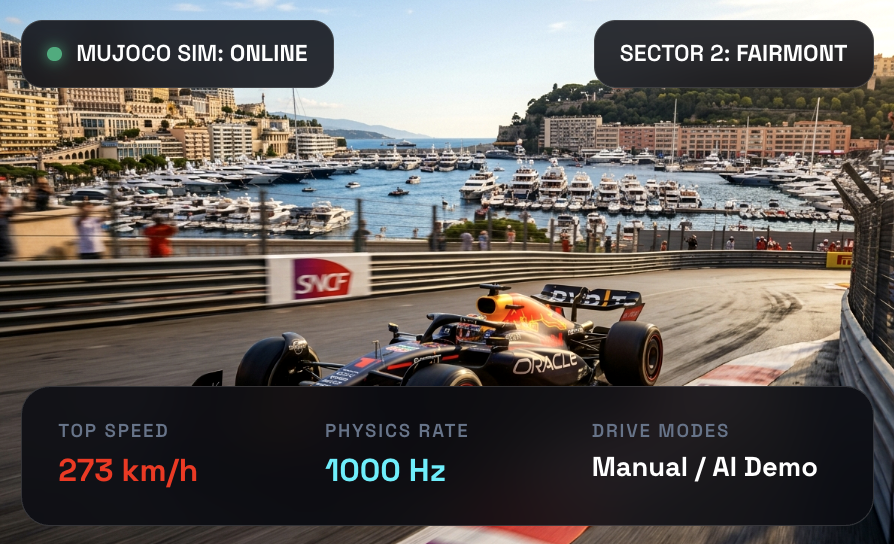
Monaco Street Circuit
# Monaco Street Circuit – User Manual Drive an F1-style car around the Circuit de Monaco, or sit back and let the demo driver take a lap. The car's physics comes from the MuJoCo physics engine, running in your browser and desktop environment. --- ## 📑 Table of Contents 1. [Quick Start](#1-quick-start) 2. [The Screen Layout](#2-the-screen-layout) 3. [Driving it Yourself (Manual Mode)](#3-driving-it-yourself-manual-mode) 4. [Demo Mode](#4-demo-mode) 5. [Cameras](#5-cameras) 6. [Lap Timing](#6-lap-timing) 7. [Warnings and Sound](#7-warnings-and-sound) 8. [Keyboard Shortcuts](#8-keyboard-shortcuts) 9. [Link & URL Options](#9-link--url-options) 10. [Troubleshooting](#10-troubleshooting) 11. [Map Data and Credits](#11-map-data-and-credits) --- ## 1. Quick Start ### 🤖 Just watch a lap 1. Wait until the status line under the buttons says *Press ▶ Start to begin*. 2. Click **🤖 Demo**, then click **▶ Start**. 3. Try switching between the three cameras: **🪖 Cockpit**, **🚗 Chase**, and **🎥 Trackside**. ### 🎮 Drive it yourself 1. Make sure **🎮 Manual** is selected, then click **▶ Start**. 2. Click **▶ FWD** to pick the forward direction. (The car does not move until you choose a direction). 3. Click **🔺 ACCEL** to speed up. It stays accelerating until you press another pedal. 4. Steer with the slider or the <kbd>←</kbd> / <kbd>→</kbd> keys. Use **🔻 BRAKE** before corners and **⏸ HOLD** to keep your current cruising speed.  --- ## 2. The Screen Layout | Area | Description | |---|---| | **Main View** | Fills the window. Shows whichever camera perspective you selected. | | **Overhead Map (Top-Left)** | Birds-eye view of the area around the car from 150 m above. The red arrow is your car. | | **HUD (Top-Right)** | Displays speed, lap number, current / last / best lap time, active steering angle sent to wheels, and driving mode. In Manual mode, it also shows active direction and pedal. | | **Credit (Top-Center)** | Source attribution for the satellite imagery and elevation data. | | **Control Bar (Bottom)** | **Top row**: Mode, camera, Start / Stop / Reset, language switch, **?** (User manual).<br/>**Bottom row**: Manual driving controls (greyed out in Demo mode).<br/>**Status line**: Displays real-time simulation state. | --- ## 3. Driving it Yourself (Manual Mode) ### Direction Controls | Button | Effect | |---|---| | **▶ FWD** | Drive forwards, up to 300 km/h. | | **■** | Stop. With no pedal pressed, the car brakes to a standstill. | | **◀ REV** | Reverse, up to about 30 km/h. Handy for backing off a barrier. | ### Pedals You can have only one pedal active at a time. Pressing another pedal switches to it, and pressing the currently active pedal releases it (coasting). | Pedal | Effect | |---|---| | **🔺 ACCEL** | Accelerates in the chosen direction (0–100 km/h in approx. 3 seconds). | | **⏸ HOLD** | Cruise control: maintains your current speed. | | **🔻 BRAKE** | Decelerates smoothly down to a complete stop. | | **(none)** | The car coasts freely and gradually loses speed due to rolling resistance and air drag. | ### Steering & Speed Sensitivity - Drag the 🔄 slider, or press <kbd>←</kbd> / <kbd>→</kbd> to steer step-by-step. - Press <kbd>C</kbd> to center steering instantly. - The slider remains where you leave it, so remember to straighten up after exiting a turn. > [!NOTE] > **Speed-Sensitive Steering**: At higher speeds, the front wheel angle is automatically limited to prevent high-speed spinouts. > - At 100 km/h: ~40% of steering authority > - At 200 km/h: ~15% of steering authority > - Near top speed (300 km/h): <10% authority > **Pro Tip**: Always **brake before the corner**, turn during entry, then accelerate upon exit! ### Tips for Circuit de Monaco - The circuit is narrow and lined with steel barriers throughout with virtually no run-off areas. - Slow down significantly for **Sainte Dévote** (Turn 1), the **Casino Square**, the famous **Fairmont Hairpin**, the **Nouvelle Chicane** (tunnel exit), and **La Rascasse**. - The **Tunnel** and the **Harbour straight** are the fastest full-throttle sections. - If stuck against a barrier: Select **◀ REV** and press **🔺 ACCEL** to back off, steer clear, then switch back to **▶ FWD**. Alternatively, press **↺ Reset**. --- ## 4. Demo Mode In **🤖 Demo** mode, an AI autopilot accurately traces the optimal racing line with pre-computed speed targets and braking points. A complete lap takes just over 2 minutes. - You can toggle between Manual and Demo modes at any moment, even while driving at top speed. - Switching to **🎮 Manual** transfers control smoothly: **▶ FWD** and **⏸ HOLD** are engaged, keeping your speed while centering the steering. - Switching back to **🤖 Demo** lets the AI resume navigation from the car's current track location.  --- ## 5. Cameras | 🪖 Cockpit | 🚗 Chase | 🎥 Trackside | |:---:|:---:|:---:| |  |  |  | | Camera | View Perspective | |---|---| | **🪖 Cockpit** | Driver's eye level behind the Halo, front wheels, suspension arms, and nose cone. | | **🚗 Chase** | Positioned slightly behind and above the rear wing. The most intuitive view for driving. | | **🎥 Trackside** | TV broadcast spectator view. Trackside camera towers are placed every ~130 m along the circuit. The nearest camera tracks and zooms on the car, switching automatically to the next station as the car passes. | Press <kbd>V</kbd> on your keyboard to quickly cycle through all available cameras. --- ## 6. Lap Timing - The car starts on the starting grid just behind the chequered start/finish line (HUD shows `Lap: grid`). - Crossing the start/finish line initiates Lap 1 and starts the timer. - Each subsequent crossing registers the lap, updating **Last Lap** and **Best Lap** records. - Lap times are measured strictly in physical simulation time (SIM_DT), ensuring accurate timing regardless of frame rates. - Pressing **↺ Reset** relocates the car back to the starting grid and clears lap records. --- ## 7. Warnings and Sound | Warning Alert | Trigger Condition | Consequence | |---|---|---| | **⚠ CRASH** | Car makes contact with a track barrier | Flashing red warning overlay and a 3-beep alarm. Automatically clears 1.5 s after contact ceases. Driving continues uninterrupted. | | **⚠ OUT OF BOUNDS** | Car reaches boundary perimeter wall | Identical to crash alert. | | **⚠ ROLLOVER** | Car chassis tilts beyond ~73° for more than 0.2 s | Physics simulation halts with a persistent rollover alert. Press **↺ Reset** to recover. | > [!TIP] > Audio requires user interaction to enable. Audio automatically activates upon clicking **▶ Start**. --- ## 8. Keyboard Shortcuts | Shortcut Key | Action | Supported Mode | |---|---|---| | <kbd>←</kbd> / <kbd>→</kbd> | Steer left / right (one step) | Manual | | <kbd>C</kbd> | Center steering | Manual | | <kbd>F</kbd> / <kbd>S</kbd> / <kbd>R</kbd> | Forward (FWD) / Stop / Reverse (REV) | Manual | | <kbd>Space</kbd> or <kbd>W</kbd> | Toggle ACCEL (Accelerate) | Manual | | <kbd>H</kbd> | Toggle HOLD (Cruise control) | Manual | | <kbd>B</kbd> | Toggle BRAKE | Manual | | <kbd>V</kbd> | Cycle camera view | Both | | <kbd>M</kbd> | Toggle Manual ⇄ Demo mode | Both | | <kbd>L</kbd> | Toggle English ⇄ 日本語 language | Both | --- ## 9. Link & URL Options You can launch the app with custom query parameters in the URL: | Option | Values | Description | |---|---|---| | `mode` | `manual` or `demo` | Initial driving mode | | `view` | `cockpit`, `chase`, or `trackside` | Initial camera perspective | | `lang` | `en` or `ja` | Interface language | | `autostart` | (no value) | Starts physics simulation immediately on load | **Example**: `index.html?mode=demo&view=trackside&autostart` launches directly into a Trackside Demo lap. --- ## 10. Troubleshooting | Symptom | Solution | |---|---| | **Stuck on *Loading Monaco…*** | Initial download is ~14 MB. Allow a few moments to finish. Ensure the app is served via web server or launched as desktop app. | | ***Failed to load*** | Reload the application. The error message indicates the exact asset file that failed. | | **Black or blank screen** | Requires WebGL and WebAssembly support. Check that hardware acceleration is enabled in your browser/webview settings. | | **Low FPS / Stuttering** | Reduce the application window size or close heavy background programs. The engine renders two simultaneous viewports (Main 3D view + 2D Overhead radar). | | **Car does not move** | Verify that the status line reads *Running*, **▶ FWD** is selected, and **🔺 ACCEL** is turned on. After a rollover, click **↺ Reset**. | | **Car refuses to turn at high speed** | Speed-sensitive steering limiter is active. Apply brakes before entering corners. | | **No audio** | Press **▶ Start** to initialize Web Audio context, and check system volume. | --- ## 11. Map Data and Credits - **Terrain & Elevation**: SRTM 1″ elevation dataset. - **Satellite Imagery**: [Sentinel-2 cloudless 2016](https://s2maps.eu) by EOX IT Services GmbH (contains modified Copernicus Sentinel data 2016), licensed under CC BY 4.0. - **Circuit Layout & City Blocks**: Traced from Monaco street circuit schematics. City buildings and foliage are procedurally generated representations. - **Physics Engine**: [MuJoCo (Multi-Joint dynamics with Contact)](https://mujoco.org/) via WebAssembly. - **3D Graphics**: [three.js](https://threejs.org/). - **Vehicle Model**: Generic formula racing car with aerodynamic downforce, 4-wheel independent suspension, and speed-sensitive steering. - **Circuit Scale**: Traced track length is 3,211 m (official circuit is 3,337 m). Certain tight sections (Rascasse and Hairpin) were widened slightly for optimal physics stability.
 stpeteishii View creator →