
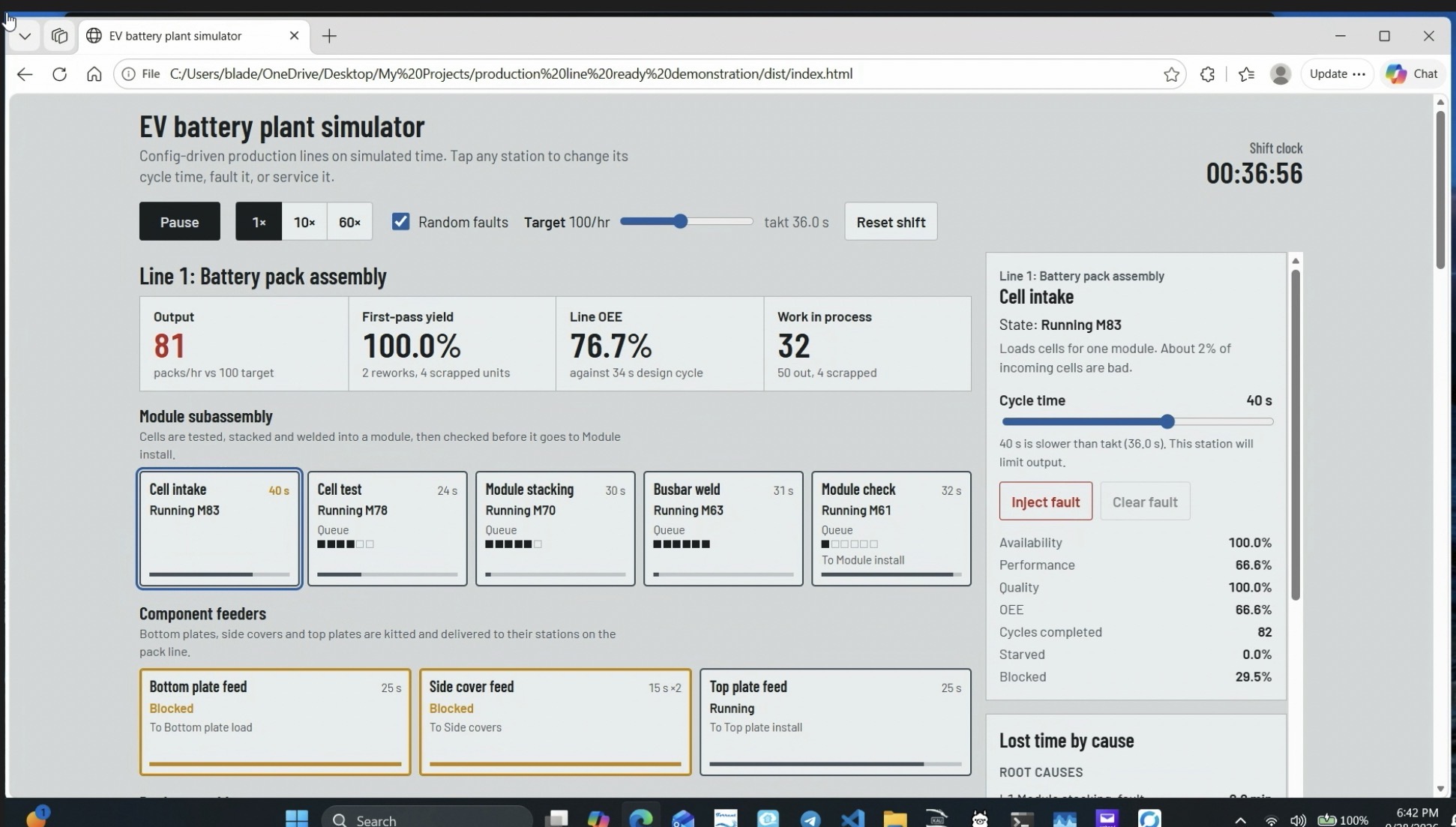
EV battery plant simulator
# EV battery plant simulator **Demo video:** [Watch the simulator running](EV%20Battery%20Plant%20Demo%20Video/Ev-Battery-Demo-Video.mp4) A config-driven production plant simulator with a live dashboard. Three connected lines run on the same simulated clock: - **Line 1, battery pack assembly:** module subassembly (cell test, stacking, laser busbar weld), component feeders, and pack assembly with adhesive dispense, open-time limits, end-of-line test, and rework loops. - **Line 2, pack finishing and vehicle integration:** HV harness install, BMS flash, charge and discharge test, then pack marriage into a chassis, HV and coolant connect, coolant fill, and a vehicle function check. - **Line 3, final trim and quality audit:** seats, interior trim, wheels and tires, and fluid fill, then panel, torque, and final quality audits before the vehicle ships. Each line hands its output to the next through a transfer buffer. If a downstream line stops, the buffer fills and then blocks the line feeding it, the same way stations inside a line interact. ## Layout - `src/engine.ts`: simulation engine (`Station`, `Line`, `Plant`). Fixed-step and deterministic when given a seeded `rand`, so runs are reproducible and testable. - `src/line1.ts`: Line 1 definition as data. - `src/line2.ts`: Line 2 definition as data. - `src/line3.ts`: Line 3 definition as data, plus `PLANT_LINES` and `PLANT_CONNECTIONS`. - `src/ui.ts`: dashboard; renders any number of lines from their definitions. - `test/sim.test.ts`: headless checks for each line and for the connections between them. - `src/index.html`: page shell; the build inlines the compiled app into it. Full annotated tree: [Directory Tree](Directory%20Tree/Directory%20Tree) ## Build Requires Node.js (18 or newer). From the project folder: npm install # one time, installs TypeScript locally npm run build # compiles, runs tests, writes dist/index.html Open `dist/index.html` in a browser to run the simulator. ## Adding another line 1. Create `src/lineN.ts` with a `LineDef`. Its first station has no `src`, so it pulls from its queue, which the upstream line fills. 2. Point the upstream line's last station at it with `out: { export: '<connection id>' }`. 3. Add it to `PLANT_LINES` and add a connection to `PLANT_CONNECTIONS`: { id: 'l3-l4', label: 'Transfer, Line 3 to Line 4', fromLine: 'line3', toLine: 'line4', toStation: '<first station id>', capacity: 8 } These lists live in the last line file, since each file can only use lines defined before it. 4. Add the new file to `files` in both tsconfig files, after the line it depends on. A line whose export is not connected ships its output, so any line can still run and be tested on its own. ## Station behaviours Stations are composed from optional behaviours rather than special-cased code: `src` (creates parts), `needs` (consumes components), `introduce` (adds a defect, optionally with drift over time), `inspect` (detects a defect, then rework or scrap), `startTimer` / `checkTimer` (open-time limits), `consumable` (drums, totes; an empty one stops the station until a tech changes it), and `service` (planned maintenance that resets drift, such as cleaning laser optics). ## Note Generic demonstration model inspired by battery pack assembly, vehicle integration, and final assembly. Cycle times, defect rates and layout are invented for illustration.
seablade View creator →