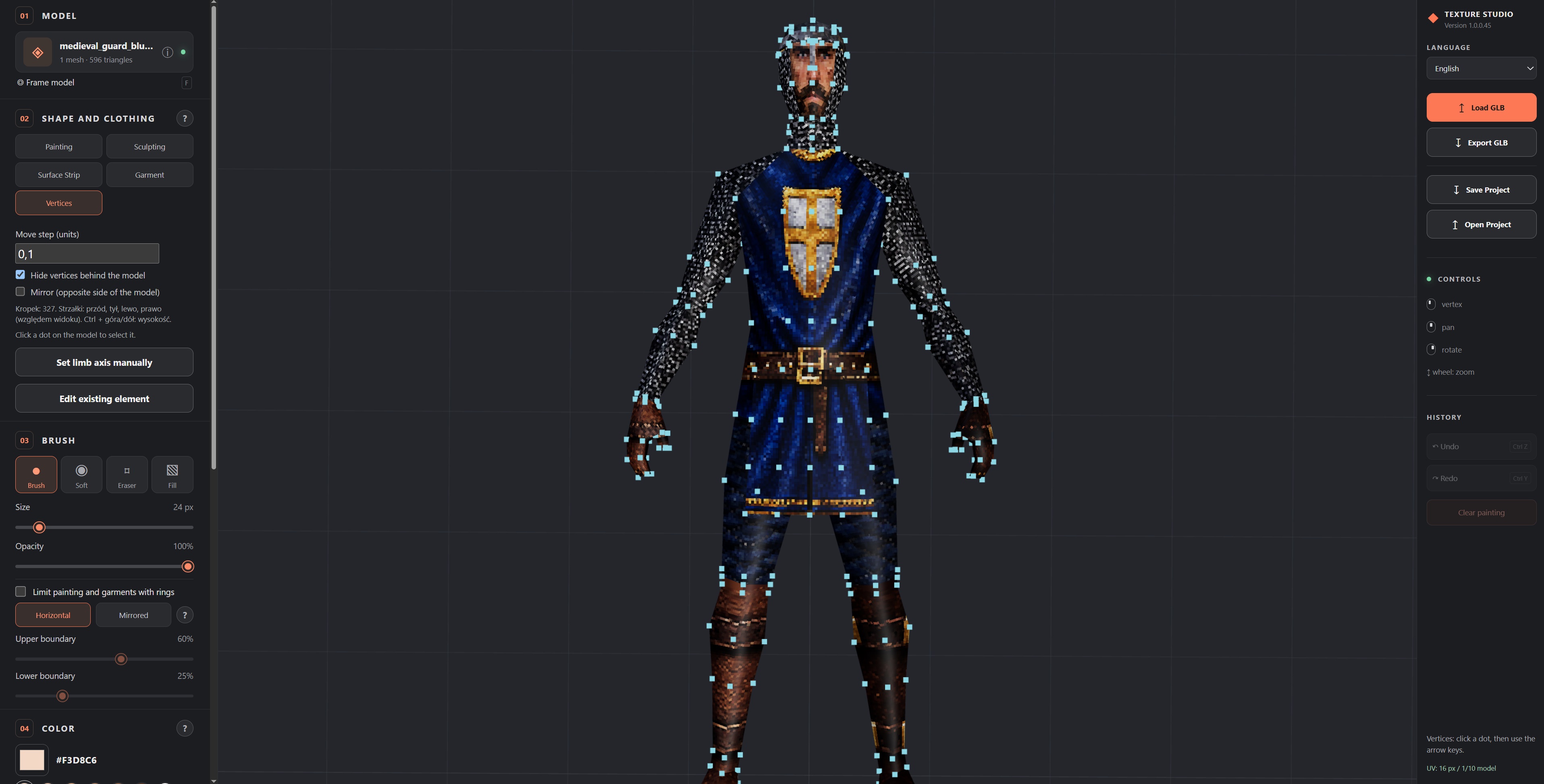
GLB 3D Model Painting / sculpting Tool
Texture Studio – Online 3D Model Painting & Sculpting Tool Paint, reshape and dress GLB models directly in your browser. Load a character, texture it, adjust its shape and export a ready-to-use GLB. Everything runs locally, so your files never leave your computer. Features Painting Real-time painting on 3D models with Brush, Soft, Square and Fill tools.Adjustable size and opacity, a colour picker and quick skin-tone swatches.Four texture slots (PNG, JPG, WebP, BMP) to paint with image patterns.Limit painting between two height rings, or mirror the rings on matching arms and legs. Works on rigged and unrigged characters.Eraser, Undo/Redo and a "Clear painting" button. Textures Drag and drop a full UV atlas image onto the window to replace the model's texture."Texture density" and "Normalize" settings control texture sharpness. Choose a crisp pixel-art look or smooth Soft filtering. Shape editing Sculpt arms, legs, torso and shoulders. Widen or narrow them with a smooth or square brush.Vertices mode: shows the model's vertices as dots. Click one and move it with the arrow keys (default step 0.1), or hold Ctrl for up and down.Options to hide dots behind the model and to mirror edits to the opposite side. For example, widen both shoulders at once. Clothing and accessories Surface Strip: add 3D bands that follow the model's surface, including closed rings around limbs or the torso.Garments: create separate clothing shells for the torso, arms and legs in fitted, loose or armor styles.Five helmet styles: ancient, medieval, late medieval, military and modern.Built-in fabric, leather, metal and skin materials. Projects and export Export the finished model as GLB with textures and geometry included.Save and reopen .texturestudio projects with the full undo history.Interface available in English and Polish. How to use Click "Load GLB" or drag a .glb file onto the scene.Choose a mode (Painting, Sculpting, Surface Strip, Garment or Vertices), then a tool and a colour.Left-click and drag to paint. Right-click to rotate, middle-click to pan and scroll to zoom. Press F to frame the model.Optionally drop a UV atlas image to retexture the model.Click "Export GLB", or save your project to continue later. No installation required. Works in any modern desktop browser (Edge, Chrome, Firefox).
 Jonasz O. 2 games· 1.3k followers· 110 ratings· portfolio 72 View creator →
Ratings over time
Cumulative · 30dComments over time
Cumulative · 30dScreenshots
1 / 3